
Manage Shopify and WooCommerce inventory together
You sell the same products on a Shopify store and a WooCommerce store, from one shelf of stock. Orvendory links each variant across the two stores, passes stock changes from one to the other and lists the orders from both in one place.
Orvendory's Shopify app is in Shopify's App Store review, so Shopify stores cannot install it yet. A demo shows the full workflow on our test stores.
Two platforms drawing on one stock
A sale on one platform does not reach the other
When Shopify sells the last pair, WooCommerce still shows it in stock until somebody changes the number by hand.
The platforms describe products differently
Shopify has products with variants, WooCommerce has variable products with variations, and their IDs never match. Keeping track of which item is which usually ends up in a spreadsheet.
Orders sit in two admin panels
Seeing what sold today, or what still needs packing, means opening both dashboards and adding up.
Example: one product on both platforms
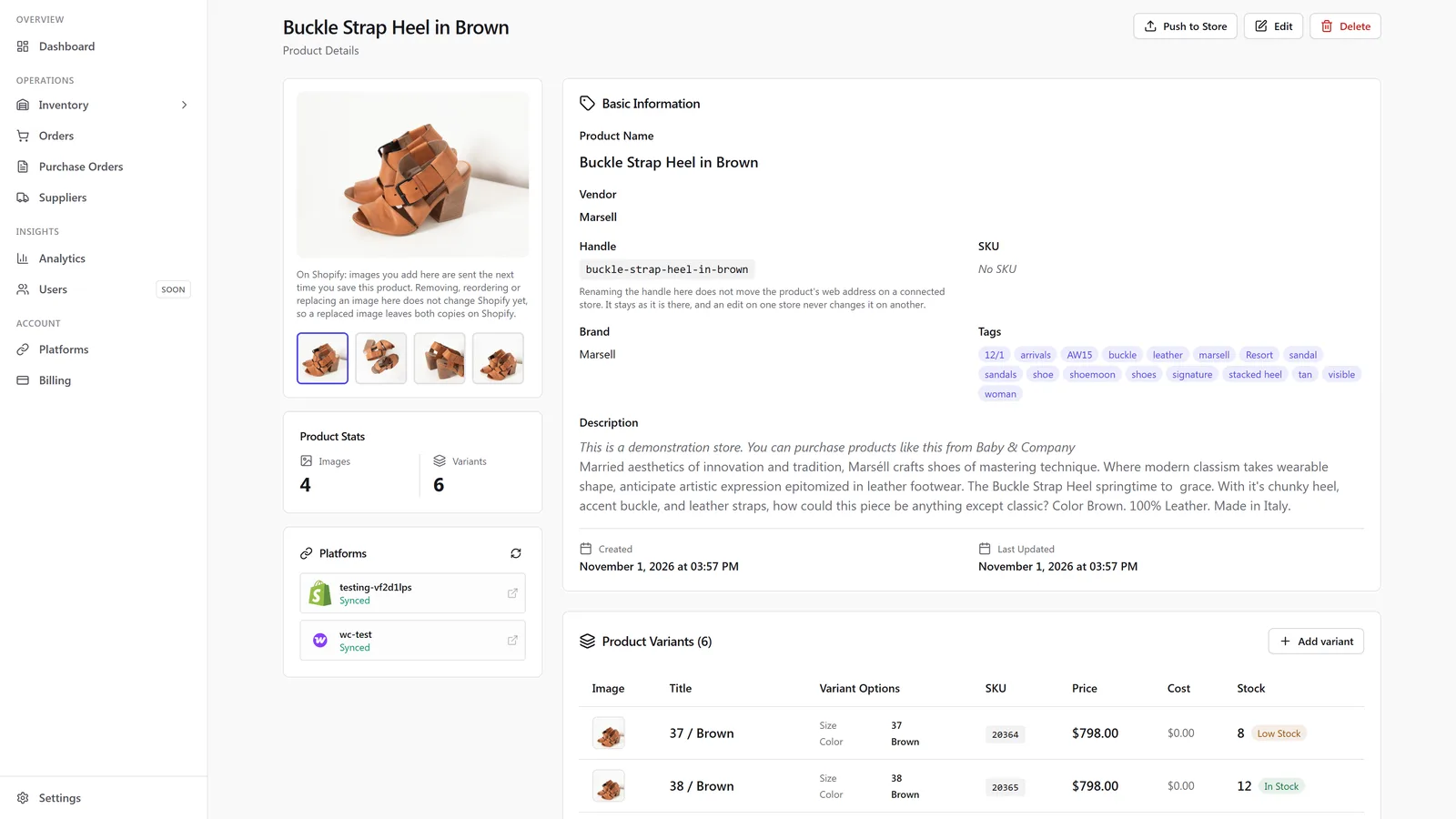
Buckle Strap Heel in Brown is on our Shopify test store and our WooCommerce test store, in six sizes. These are the steps and the screens as Orvendory shows them.
The product is on both stores
The Shopify store has it as a product with size variants; the WooCommerce store as a variable product with size variations.
Each size is linked
Size 38 in Orvendory is linked to the Shopify variant and to the WooCommerce variation for size 38, and so on for every size. The product page lists both stores under Platforms.
Stock changes once and reaches both
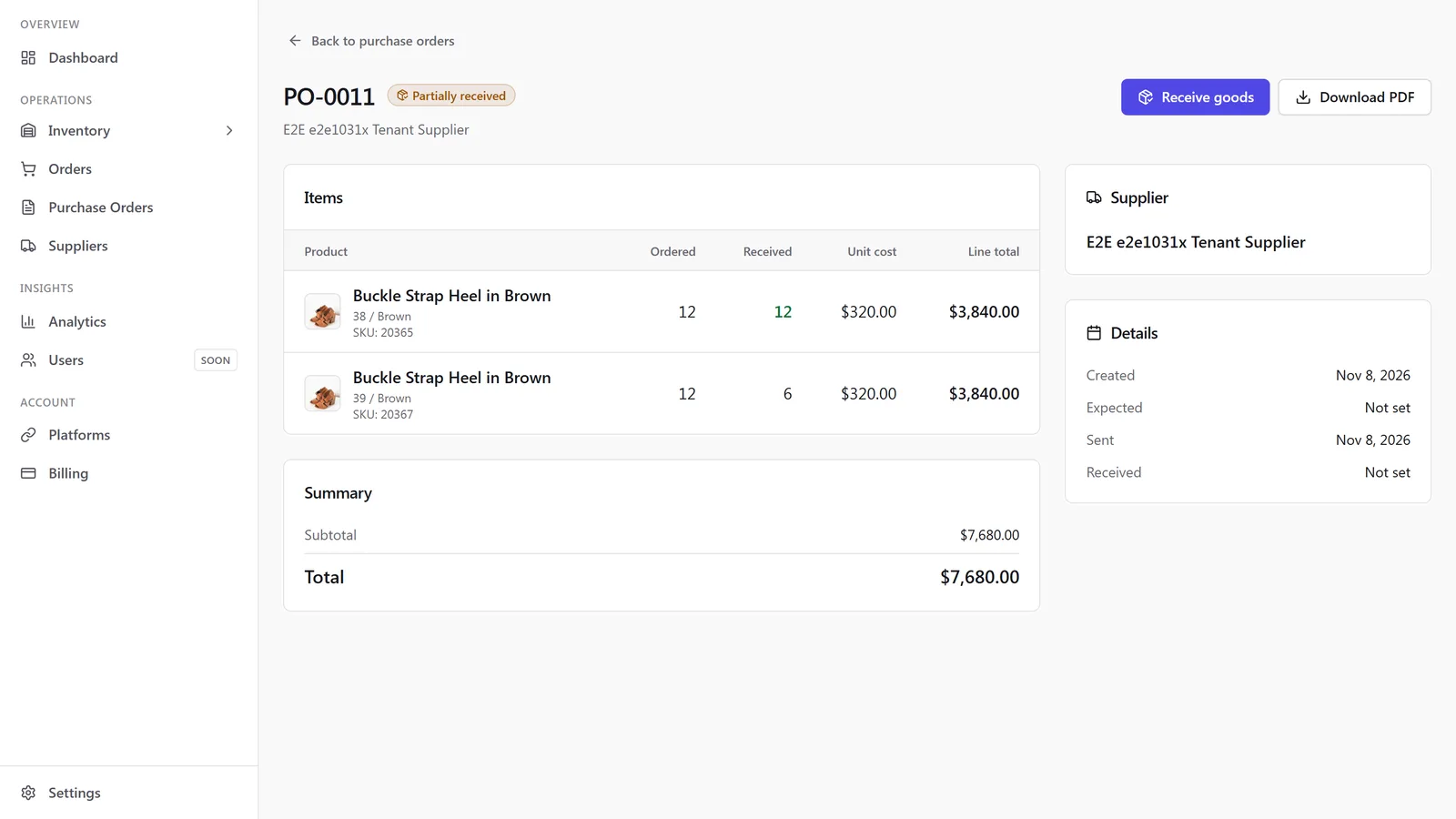
Purchase order PO-0011 was received: 12 of size 38 and 6 of size 39. Orvendory raised those sizes from 0 to 12 and from 0 to 6 and sent the change to both stores. We checked both quantities in the Shopify and WooCommerce admins afterwards.
Orders from both stores, side by side
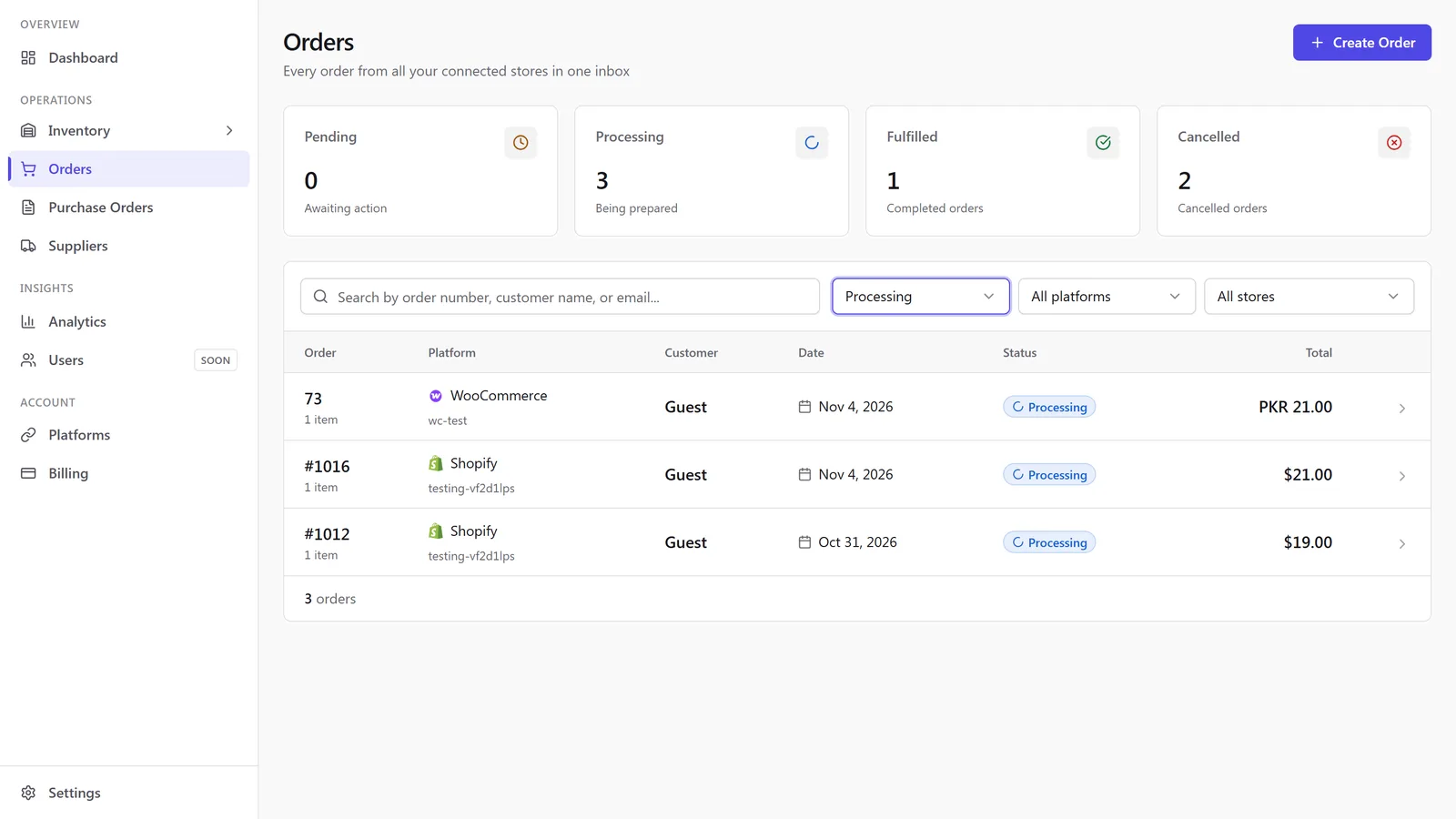
Order #1016 from the Shopify store and order 73 from the WooCommerce store appear in one list, each with its platform and store name.
Screens captured from Orvendory on 8 November 2026 with our own test stores (a Shopify development store and a WooCommerce test store) and products from Shopify's sample catalogue. No merchant data is shown.
How stock moves between Shopify and WooCommerce
- When a store's quantity changes, after a sale or an edit in its admin, the store notifies Orvendory through a webhook. Orvendory does not wait for a scheduled poll.
- Orvendory records the change as a movement, such as minus one, on its own count for that variant, then applies the same movement to the other store.
- Because changes are movements rather than overwrites, two sales of the same item at about the same time are both subtracted. We tested this with a Shopify and a WooCommerce store: 10 on each, one sale on each, 8 on both.
- Orvendory does not reserve stock across stores. If both stores sell the last unit before either update arrives, both sales happen; you will see the count go below zero in Orvendory.
- If Orvendory cannot confirm that an update reached a store, it stops updating that variant on that store and asks you to choose the right quantity instead of guessing.
What you can do from one place
Edit once, update both stores
Change a price or a title in Orvendory and only the fields you changed are sent to each store the product is on.
See where the stores differ
An edit made directly in Shopify or WooCommerce stays on that store. Orvendory records it and shows the difference, with a choice to keep Orvendory's value or take the store's.
Work with orders from both platforms
Filter orders by platform or store, and create, edit or cancel an order in Orvendory. The change is sent to the store the order belongs to.
Receive stock against purchase orders
Record what you ordered from a supplier. Receiving goods adds the stock once and sends it to both stores.
Find what is running low
The Inventory health report lists variants at or below a low-stock threshold, from one count per variant instead of two.
Setup and limits
What you need
- A Shopify store, connected through Orvendory's Shopify app once Shopify has approved it.
- A WooCommerce store served over HTTPS, connected by approving access in WooCommerce with an Administrator or Shop manager account. No WordPress plugin is installed.
- When a store connects, Orvendory imports its products. A product that matches one Orvendory already has is listed for you to review, not imported twice.
What to know before you start
- Only stock travels between stores. A title, price or description edited in Shopify's admin is not copied to WooCommerce, or the other way round.
- Shopify stock is read and written at one location per store.
- Orders placed before a store was connected are not imported.
- On WooCommerce, simple and variable products are supported. Other product types, including those added by extensions, have not been tested.
Questions
If I change a price in Shopify, does WooCommerce change too?
No. An edit made in one store's admin stays on that store; Orvendory records it and shows it as a difference you can resolve. To change both stores, edit the product in Orvendory, which sends the changed fields to each store the product is on.
How does Orvendory know which Shopify variant matches which WooCommerce variation?
You link them. When the second store is imported, a product with the same name or handle as one already in Orvendory is listed for review. Choosing Merge links each variant to its counterpart by SKU; a product with one variant and no options on each side can be linked without one. If not every variant can be matched, the merge is refused and nothing is changed. You can also push a product from Orvendory to the other store, which creates it there already linked.
Does an order change my stock in Orvendory?
Not directly. When a store takes an order it lowers its own stock and reports that change, and that report is what moves the stock. The order itself is listed for you to view and manage, so a sale is never counted twice.
Can both stores still sell the last unit?
Yes, it can happen. Orvendory passes each change on as soon as the store reports it, but it does not hold stock for one store while the other is selling. Keep a safety margin on items that sell out fast.
Can I connect my Shopify store today?
Not yet. Orvendory's Shopify app is in Shopify's App Store review. Request a demo to see the workflow on our test stores.
See it with your own catalogue in mind
Tell us roughly how many products you sell on each platform and how much they overlap, and we will walk you through Orvendory on our test stores.
Orvendory's Shopify app is in Shopify's App Store review, so Shopify stores cannot install it yet. A demo shows the full workflow on our test stores.
No mail app? Write to [email protected]